<script>document.createElement("myHero")</script> <!--The JavaScript statement document.createElement("myHero") is added-->
<style>
myHero {
display: block;
background-color: #ddd;
padding: 50px;
font-size: 30px;
}
</style>
</head>
<body>
<h1>My First Heading</h1>
<p>My first paragraph.</p>
<myHero>My First Hero</myHero>
</body>
</html>
#3. HTML5 New Elements New Semantic/Structural Elements 具体改变看文档 HTML5文档
#4. HTML5 Semantic Elements 语义元素Semantic elements是元素的意义
语义元素可以清晰的给开发者和浏览器描述含义, 没有语义的元素没有告诉任何含义, 例如:`: <div> and <span>`,带有语义的元素清晰的定义了含义:<form>, <table>, and <img>
##4.1. Browser Support IE9(IE8及以下不支持) chrome 火狐 欧朋(opera)
##4.2. New Semantic Elements in HTML5
现今许多web网站包含html代码,例如: <div id="nav">, <div class="header">, or <div id="footer">, to indicate navigation links, header, and footer
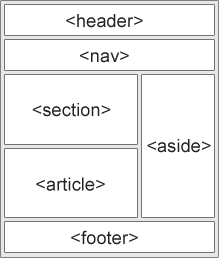
html5提供新语义元素用以更清楚的定义网站的每个模块布局
##4.3. HTML5 Element <section> 元素定义了一个文档中的片段
1
2
3
4
<section>
<h1>WWF</h1>
<p>The World Wide Fund for Nature (WWF) is an international organization working on issues regarding the conservation, research and restoration of the environment, formerly named the World Wildlife Fund. WWF was founded in 1961.</p>
</section>
##4.4. HTML5 Element
<article> element表示独立,自用的内容
article应该有意义,并应该尽可能在网站的剩余空间中独立分布 <article>应该用于:
Forum post
Blog post
News story
Comment
1
2
3
4
5
<article>
<h1>Internet Explorer 9</h1>
<p>Windows Internet Explorer 9 (abbreviated as IE9) was released to
the public on March 14, 2011 at 21:00 PDT.....</p>
</article>
##4.5. HTML5
1
2
3
4
5
6
<nav>
<a href="/html/">HTML</a> |
<a href="/css/">CSS</a> |
<a href="/js/">JavaScript</a> |
<a href="/jquery/">jQuery</a>
</nav>
##4.6. HTML5
1
2
3
4
<aside>
<h4>Epcot Center</h4>
<p>The Epcot Center is a theme park in Disney World, Florida.</p>
##6.12. Input Type: search The search type类似于一个文本输入框, 用于进行搜索
1
2
3
4
5
<form action="demo_form.asp">
Search Google:
<input type="search" name="googlesearch">
<input type="submit" value="Send">
</form>
##6.13. Input Type: url The url type用于输入utl地址
根据不同的浏览器。 这个url会被自动识别是否合法,一些智能手机也能识别
1
2
3
4
5
<form action="demo_form.asp">
Add your homepage:
<input type="url" name="homepage">
<input type="submit" value="Send">
</form>
#7. HTML5 Form Attributes html5中<form>和<input>有一些新的属性
<form> : autocompletenovalidate
<input>:: autocomplete autofocus form formaction formenctype formmethod formnovalidate formtarget height and width list min and max multiple pattern (regexp) placeholder required step
##7.3. <input> autofocus Attribute autofocus Attribute是一个布尔属性 an <input> element should automatically get focus when the page loads.当加载页面的时候,自动进入input输入框状态
1
2
3
4
5
<form action="demo_form.asp">
First name:<input type="text" name="fname" autofocus><br>
Last name: <input type="text" name="lname"><br>
<input type="submit">
</form>
##7.4. <input> form Attribute(不理解) form属性 指定一个<input>元素属于一个或多个表单。 要引用一个以上的表单,使用表单ID的空格分隔的列表
1
2
3
4
5
6
7
<form action="demo_form.asp" id="form1">
First name: <input type="text" name="fname"><br>
<input type="submit" value="Submit">
</form>
<p>The "Last name" field below is outside the form element, but still part of the form.</p>
Last name: <input type="text" name="lname" form="form1">
##7.5. <input> formaction Attribute OperaSafariChromeFirefoxInternet Explorer
The formaction attribute指定文件的URL, 这个文件会在表单提交的时候进行输入处理
The formaction attribute不考虑form中的the action attribute
Note:这个属性与type=”submit” and type=”image”一起使用
1
2
3
4
5
6
<form action="demo_form.asp">
First name: <input type="text" name="fname"><br>
Last name: <input type="text" name="lname"><br>
<input type="submit" value="Submit"><br>
<input type="submit" formaction="demo_admin.asp" value="Submit as admin">
</form>
##7.6. <input> formenctype Attribute OperaSafariChromeFirefoxInternet Explorer
The formenctype attribute指示表单数据怎么编码, 当数据提交到服务器的时候(只有在form的method = “post”)
The formenctype attribute覆盖<form>元素的the enctype attribute
Note:The formenctype attribute is used with type=”submit” and type=”image”.
The list attribute 是指<datalist> elemen, 它包含预先定义的选项的<input> (The list attribute refers to a
1
2
3
4
5
6
7
8
9
10
<input list="browsers" name="browser">
<datalist id="browsers">
<option value="Internet Explorer">
<option value="Firefox">
<option value="Chrome">
<option value="Opera">
<option value="Safari">
</datalist>
<input type="submit">
</form>
##7.12. <input> min and max Attributes Note: The min and max attributes works with the following input types: number, range, date, datetime, datetime-local, month, time and week. The min and max attributes是指<input>中最大值和最小值 Note: The min and max attributes 与以下input 类型一起共存: number, range, date, datetime, datetime-local, month, time and week.
Note: The required attribute works with the following input types: text, search, url, tel, email, password, date pickers, number, checkbox, radio, and file.